
YOUR FIRE
SAFETY HUB.
ONLINE.
DEPENDABLE | PROFESSIONAL | COMMITTED
Manage your fire protection compliance, service schedules, certificates, and reports all in one secure, easy-to-use portal. Available 24/7, anywhere in the world.
24/7
Portal Access
100%
Compliance Visibility
WA Wide
Coverage
Est. 2016
Trusted & Proven
HOW TO ACCESS YOUR PORTAL
LOGGING IN — STEP BY STEP
Your Client Portal is powered by Integral Fire Protection’s industry-leading field service management software, branded and configured specifically for you, our valued client.
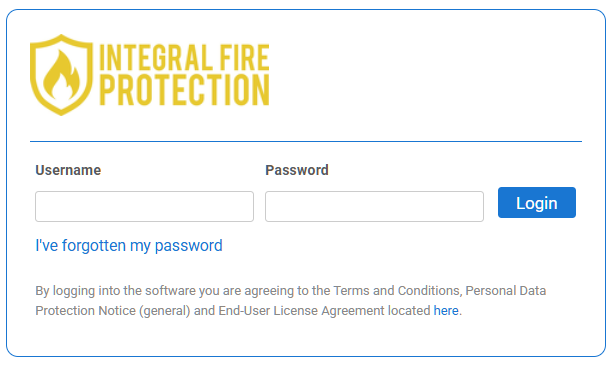
- Go to: Client Portal
- Enter your Username (your registered email address)
- Enter your Password — click ‘I’ve forgotten my password’ to reset if needed
- Click Login — you’ll be taken straight to your dashboard
If you have not yet received your login details, contact our office on (08) 9467 7319 or email us and we will set you up.
What’s Inside
EVERYTHING YOUR BUSINESS
NEEDS. ONE PLACE.
The Integral Fire Protection Client Portal is designed around what matters most to you; visibility, compliance and complete peace of mind.
Service Certificates & Reports
Access and download all your service certificates, inspection reports, and compliance documents the moment our technicians complete the job. No chasing paperwork.
Compliance Dashboard
A clear, real-time view of your compliance status across all your sites. See what's current, what's due, and what needs attention — all in one screen.
Full Service History
Every job we've ever done for you, logged and searchable. Whether for an audit, insurance, or due diligence — your complete fire safety history is always at your fingertips.
Compliance Made Simple
KNOW YOUR STATUS.
AT ALL TIMES.
As a business owner, your fire protection compliance isn’t optional, it’s a legal obligation. Our portal gives you instant visibility across every site, every piece of equipment, and every upcoming service.
No more spreadsheets. No more missed service dates. No more scrambling for certificates during audits.
- Real-time compliance percentage across all equipment
- Instant certificate downloads for any inspection
- Defect flagging and resolution tracking
- Audit-ready reports generated in seconds
- Multi-site management from a single login
PORTAL NAVIGATION GUIDE
YOUR Client PORTAL
MENU — EXPLAINED
Once logged in, you’ll see the navigation bar across the top of your screen. Here’s what each section contains:
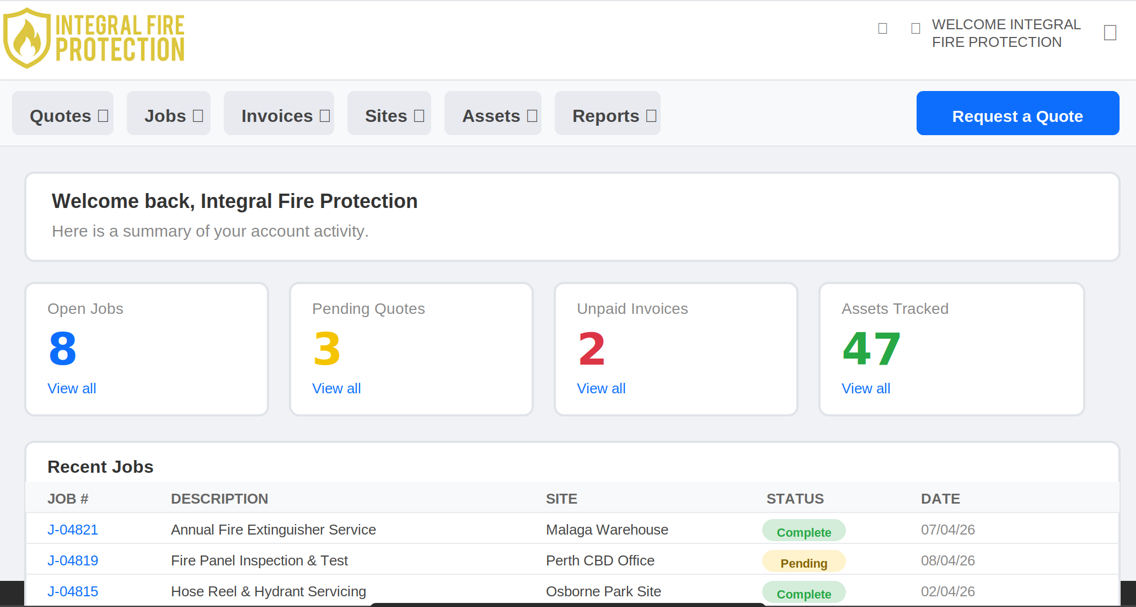
Quotes
View pending and accepted quotes. Accept or request a new quote directly from the portal.
Jobs
See all your scheduled, in-progress, and completed jobs. View job cards, technician notes, and attachments.
Invoices
Access all your invoices — paid and unpaid. Download copies and pay online via Client Portal Payments.
Sites
View and manage all your site locations. Update site contacts and details at any time.
Assets
See all the fire equipment and assets we track and maintain at your sites. View service history per asset.
Reports
Run and download compliance and service reports. Perfect for WHS audits and insurance requirements.
READY TO TAKE CONTROL OF YOUR COMPLIANCE?
Existing clients can log in right now. New to Integral Fire Protection?
Get in touch and we’ll get you set up.